

Custom domain & email
You can connect your organization to your own domain (e.g. yourclub.com). This covers
two separate things you can set up independently:
| What it does | Where in the dashboard | |
|---|---|---|
| Website on your own domain | Your public site is reachable at www.yourclub.com instead of yourclub.moep.cloud. | Settings → Custom domain |
| Email from your own domain | Invitations and notifications come from …@yourclub.com instead of the platform address. | Settings → Email sender domain |
Both are unlocked via DNS records at your domain provider. You’ll need access to your domain’s DNS management (e.g. GoDaddy, Cloudflare, Infomaniak, IONOS …). The platform checks the records and only enables the feature once they are set correctly.
DNS takes patience. DNS changes aren’t visible worldwide instantly. Expect anything from a few minutes up to 24 hours before the check passes. Set the records, wait, and click “Check” again later — you never need to create anything twice.
Part 1 — Website on your own domain
Section titled “Part 1 — Website on your own domain”This feature is available from the Basic plan (upgrades go through the platform operator).
How to
Section titled “How to”-
Settings → Custom domain.
-
Enter your domain — usually with
wwwin front, i.e.www.yourclub.com— and click Save. -
A CNAME record appears for you to create at your domain provider:
Field Value Type CNAMEName your domain (e.g. www.yourclub.com)Value / target your org subdomain ( yourclub.moep.cloud) — the exact value is shown on screen -
Back in the dashboard, click Check status. Once the record is detected, the status flips to Active and the TLS certificate (HTTPS) is issued automatically — you don’t have to deal with it.
Via the CNAME your domain points at your org subdomain rather than a fixed server IP. That’s deliberate: if the platform later moves to a different server, your setup keeps working with no action from you.
Root domain without www?
Section titled “Root domain without www?”Many providers don’t allow a CNAME on the root domain (yourclub.com without www). Two
common paths:
- Recommended: use
www.yourclub.comand set up a redirect fromyourclub.comtowww.yourclub.comat your provider (most offer this). - If your provider supports CNAME flattening or ALIAS/ANAME (e.g. Cloudflare), you can point the root domain at the org subdomain that way.
Part 2 — Email from your own domain
Section titled “Part 2 — Email from your own domain”This makes your organization’s email (e.g. invitations) go out from your own domain. It takes a bit more work than the website, because email providers like Gmail and Outlook check very carefully that you really stand behind the domain — otherwise the mail lands in spam. Three DNS records handle that check: SPF, DKIM and DMARC.
How to
Section titled “How to”-
Settings → Email sender domain.
-
Enter the domain (e.g.
yourclub.com) and click Add. The platform generates a dedicated DKIM signing key valid only for your domain. -
Three DNS records appear. Create all of them at your domain provider — each has a copy button, and the DKIM value in particular is long.
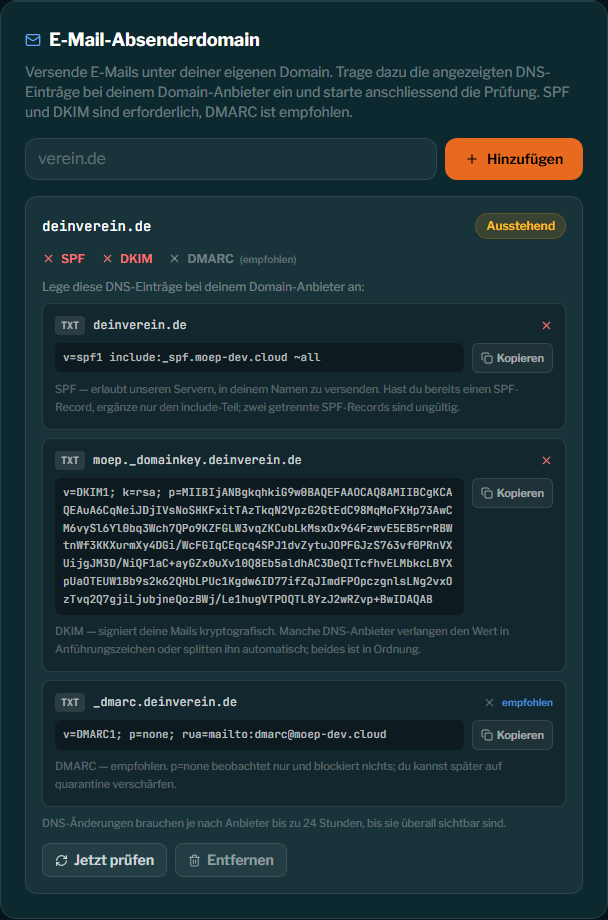
Record Type Purpose SPF TXTAuthorizes our servers to send on your behalf. Required. DKIM TXTCryptographically signs your mail — the proof of authenticity. Required. DMARC TXTTells receivers how to handle failed checks. Recommended. The exact names and values are shown on screen and tailored to your domain — enter them exactly as displayed.
-
Back in the dashboard, click Check now. You’ll see a tick or a cross for each of the three records. As soon as SPF and DKIM are correct, the domain is verified and sending from your domain is unlocked.
Important — only one SPF record per domain. A domain may have exactly one SPF record
(v=spf1 …). If you already have one — say, for another mail service — don’t add a second
one; instead merge the include: part from our screen into your existing SPF record. Two
separate SPF records make both invalid.
DMARC is recommended, not required
Section titled “DMARC is recommended, not required”The domain is already unlocked with SPF + DKIM. DMARC is still worthwhile: the suggested
record starts with p=none — it only observes and blocks nothing. A missing DMARC shows
as neutral in the check, not as an error. Once everything runs smoothly you can tighten DMARC
to p=quarantine later.
Troubleshooting
Section titled “Troubleshooting”| Symptom | Cause & fix |
|---|---|
| Status stays Pending / individual crosses | DNS isn’t visible everywhere yet. Wait and check again later — up to 24 hours is normal. |
| Invalid domain | Enter the bare domain only, without https://, without a path, without an asterisk (*). Example: yourclub.com. |
| Already connected | The domain is already linked to another organization. Each domain can only be used once. |
| Reserved | The platform domain (moep.cloud) and its subdomains cannot be used as a custom domain. |
| DKIM won’t match despite copying | Some providers wrap the value in quotes or split it — that’s fine. Check that no extra space or line break was copied along. |
| ”Email sending not yet configured” | The platform operator hasn’t enabled email sending globally yet. Contact the operator. |
Website and email are independent. You don’t have to set up both. Only want a website on your own domain? Part 1 is enough. Only want your mail to come from your domain? Part 2 is enough. For a fully consistent presence, set up both with the same domain.